

Setting Up AR (Access Requirements) for Dataset Release on Synapse
This guide documents end-to-end setup of Access Requirements (AR) for dataset release on Synapse, including security and access control policies, roles and responsibilities, how to request and verify ARs via the Privacy & Compliance Office (PCO) Jira project, and validation/troubleshooting steps before and after release.
1. Overview
Synapse protects sensitive or governed content using Access Requirements (ARs). An AR can be a simple “clickwrap” terms acknowledgement or a Managed AR that requires a Data Access Request (DAR) to be reviewed by a Data Access Committee (DAC) and/or the Synapse Access and Compliance Team (ACT). During dataset release, ARs are applied to the destination project/folders/datasets to ensure only qualified, approved users may access controlled content.
-
Clickwrap AR: users must log in and agree to terms before access.
-
Managed AR: users submit a DAR; ACT/DAC review and approve/deny per defined criteria; access may expire and require renewal.
-
AR ACL (Exemption Eligible): allows designated contributor teams to retain access to their own contributed data after ARs are applied.
2. Roles and Responsibilities
-
Data Manager / Curator: prepares entities and annotations; initiates PCO ticket; coordinates release timeline and testing.
-
PCO/ACT Governance Analyst: evaluates sensitivity and risk; defines AR structure and terms; creates/applies ARs; configures DAC workflow; verifies clickwrap links.
-
Study PI / Contributor: validates release scope; where applicable, manages PI “bypass” team membership for AR ACL exemptions.
-
Portal/Product/Program Owner: confirms governance model, adjudication path, and portal links (e.g., Explore > Studies pages).
3. Security & Access Control Policies
These principles guide how ARs are designed and applied to Synapse entities that will be released.
3.1 Data Classification and Protection
-
Controlled-Access data must be protected by a Managed AR with clear adjudication criteria (e.g., valid DUC/DUA, intended data use, institution, country-of-use checks).
-
Open or Registered-Access content may use a clickwrap to surface Terms of Use; anonymous download must follow a separate, documented approval process.
-
Limit application scope to the minimal set of Synapse entities that contain governed data (principle of least privilege).
3.2 AR Application Model
-
Apply ARs at the highest appropriate level (project/folder/dataset) to capture all controlled child entities and reduce maintenance overhead.
-
For complex releases, use multiple ARs combined with annotations and views to target data segments aligned to policy (e.g., DUO codes, human/non-human).
-
Document the AR in the Conditions for Use registry and link the governing study/portal page in the clickwrap or AR instructions.
3.3 Managed AR Review and Enforcement
-
Define approval criteria: identity, affiliation, country restrictions, intended data use (IDU), required legal instruments (e.g., DUC/DUA), IRB when applicable.
-
Set duration/expiration and renewal logic; require re-attestation on renewal to ensure current terms and accurate team composition.
-
Auditability: ensure all submissions are reviewable in the ACT dashboard; export/retain structured records where feasible.
3.4 AR ACL (Exemption Eligible) for Contributors
-
Enable a small, clearly named Synapse Team for the PI/Data Uploader to retain access post-release.
-
PCO/ACT configures the AR with Exemption Eligible and the project owner assigns the team “Can edit & delete” on relevant entities.
-
Require annual review by the PI team manager to keep membership current and minimize data exposure risk.
3.5 JSON Schema-Based ARs (Advanced)
-
For complex programs, ARs can use JSON schemas to define dynamic request forms and validation, enabling structured, queryable submissions and multi-DAC routing.
-
Coordinate with ACT to author, register, and test schema-based ARs; maintain backward compatibility with existing static ARs as needed.
4. Prerequisites for Release
-
Entities are organized and final (project/folder/dataset) with stable synIDs.
-
Annotations align with governance (e.g., DUO codes) that will activate or scope AR coverage.
-
Study/portal pages exist; identify correct Explore > Studies or equivalent destination to link in clickwrap/AR instructions.
-
Source and destination paths determined for migration from staging to released locations.
5. Requesting AR Setup via PCO Jira
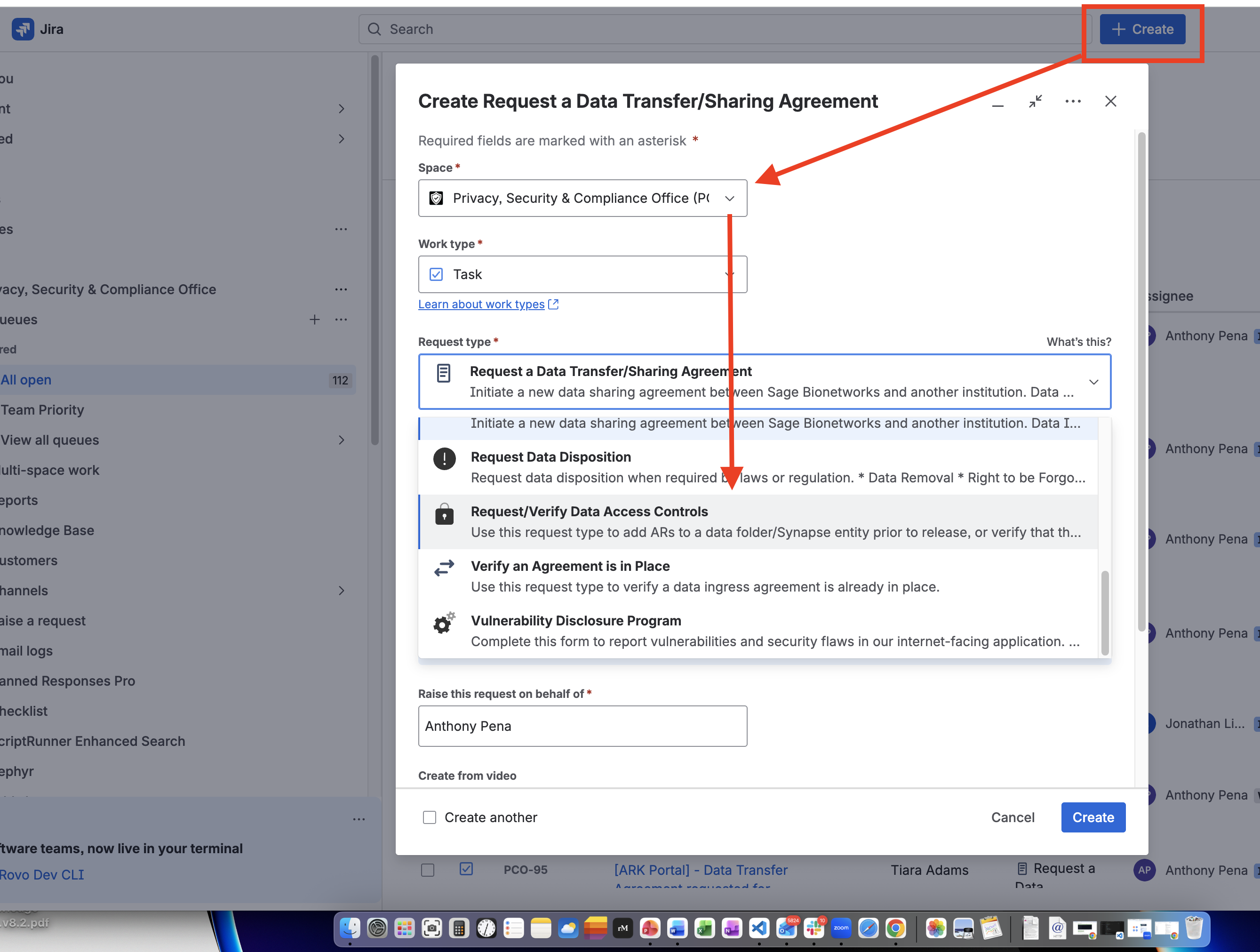
Use the PCO Jira project to request new ARs or verify existing access controls prior to dataset migration and release.
Moving forward, apply ARs to Released folders before adding any data. This ensures nothing is viewable in Synapse until the appropriate ARs are in place.
If you notify PCO a day or two before moving data into the Released folder, PCO can place and confirm ARs, then proceed with the migration. This can also serve as a CAPA if requested.
5.1 When to Open a PCO Ticket
The way this is managed in ELITE:
-
BDMs open a Jira ticket for data releases and note when ARs need to be placed due to anticipated release.
-
PCO updates the Jira ticket documenting the placement of ARs; until that update is present, data is not released.
-
This keeps accountability, avoids blocking others or missing deadlines, and creates a clear, auditable record of what ARs were placed.
-
New dataset release containing controlled-access data or updated terms.
-
Verification before moving content from staging to released folders.
-
Any change impacting clickwrap language, DAC process, or AR scope.
5.2 How to File the PCO Request
-
Request Type: “Request/Verify Data Access Controls” (or equivalent governance AR request type).
-
Summary: “Request/Verify AR for [Program/Study]: [Short purpose]”.
-
Link the ticket to the corresponding release or ADEL ticket if applicable.
-
Release scope and intent; list source and destination synIDs you plan to move (e.g., “Move files from syn123 to syn456”).
-
Data sensitivity and basis for control (e.g., human individual-level data, DUO code set).
-
Whether a Managed AR is required and the adjudication path (ACT-only or external DAC involvement).
-
Clickwrap language needs and the study/portal page URL to link in the AR UI.
-
Any AR ACL exemption team that must retain access (team name, link, and membership manager).
-
Target release window and any external dependencies (e.g., terms approval, DTA confirmation).
-
Data sharing agreements, DUA/DUC templates, IDU guidance, prior AR examples, schema definitions (if JSON schema-based AR), and screenshots of destination structure.
5.3 What PCO/ACT Will Do
-
Triage and assign a Governance analyst.
-
Review sensitivity, agreements, prior ARs; define/confirm AR structure.
-
Create/update ARs; configure DAC review; set Exemption Eligible ACL when requested.
-
Add clickwrap link to the Study Details/Conditions for Use page.
-
Notify requestor and close the ticket upon completion.
6. Verifying and Testing Access Controls (Pre-Release)
6.1 Validation Checklist
-
Managed AR appears at the destination entity level(s) intended (project/folder/dataset).
-
Clickwrap renders correct terms and links to the right study/portal page.
-
AR instructions reflect current approval criteria and document requirements.
-
AR ACL exemption team is present on sharing settings and marked Exemption Eligible in AR.
-
Expiration/renewal parameters are configured per policy.
6.2 Functional Testing
-
Use a validated and certified account to test that the AR prompts and form load correctly; submit a sample request (if applicable) and confirm adjudication flow.
-
Use an unvalidated/uncertified test account to verify access is blocked until meeting requirements.
-
Confirm dataset/file views and Explore > Studies links point to the correct, released location.
7. Migrating Data from Staging to Released
-
Confirm PCO ticket status is Resolved/Closed and governance has approved destination AR coverage.
-
Proceed with moving entities from staging to the released folder(s) as documented in your data release plan.
-
Post-migration, re-validate that ARs and sharing settings are in place at the new destination(s).
8. Post-Release Operations
8.1 Managing Access Requests
-
ACT monitors the Data Access Management dashboard to process DARs according to the published criteria and timelines.
-
For projects with external adjudication, ensure notifications and SLAs are met; maintain tracking spreadsheets where required.
8.2 Troubleshooting Access
-
To verify whether a user currently has access: open the AR, select “Review Data Requestors,” export CSV, and search the username. If not present, inspect “Review Requests” for submission status and expiration.
-
Common issues: user not logged in with the approved Synapse username; terms not yet accepted; expired access; mismatch between requested entity and AR scope.
8.3 Change Control and Deletions
-
AR updates must be coordinated with PCO and documented in Jira; test changes with both validated and test accounts.
-
Follow SOPs to remove dummy ARs only after replacement controls are in place and when no request history prevents deletion.
9. Special Cases and Advanced Patterns
9.1 Anonymous Download (Public)
-
Only for content that has no PHI/PII/sensitive risk; requires Department Head or Governance Lead approval via a PCO ticket.
-
Each entity to be made available for anonymous download must be listed; coordinate with IT Ops per SOP to enable.
9.2 AR ACL Bypass for Contributors
-
Create a small PI/Uploader team (e.g., “StudyName AR Exempt”), assign a manager, and keep membership current.
-
PCO/ACT marks the team Exemption Eligible in the AR; project owner grants appropriate local access.
9.3 JSON Schema-Based ARs
-
Use for multi-section forms, strong validation, and scalable adjudication across multiple datasets or DACs.
-
Coordinate schema design, storage of structured submissions, and UI rendering with ACT/Platform per acceptance criteria.
10. Request Templates and Examples
10.1 PCO Jira Summary Examples
-
Request/Verify AR for AD Study [syn123 → syn456]: Confirm Managed AR and clickwrap for controlled human data; configure PI Exempt team.
-
Verify Data Access Controls for Release: Moving “Staging/StudyA” (syn111) to “Released/StudyA” (syn222); confirm AR inheritance and clickwrap link to Explore > Studies page.
10.2 Information to Include
-
Source and destination synIDs; entity map or screenshot.
-
Governance basis (DUO codes, agreements) and adjudication path.
-
Clickwrap link target; AR ACL team link and manager.
-
Target timeline and dependencies.
11. Governance Best Practices
-
Minimize AR proliferation: apply at appropriate parent, avoid redundant overlapping ARs.
-
Align annotations and DUO codes with governance logic before AR setup.
-
Maintain Conditions for Use registry entries and public-facing documentation.
-
Review exemption teams at least annually; remove unneeded memberships promptly.
-
Maintain audit trails via Jira tickets, dashboard exports, and versioned SOP links.
12. Frequently Asked Questions
13. References
-
(Under revision) Access Requirements with Access Control Lists (AR ACL)
-
How to Enable Anonymous Download of Synapse Data (current 2026)
Appendix A: PCO Jira Request – Copy/Paste Template
Summary: Request/Verify AR for [Program/Study] – Move [synSOURCE] → [synDESTINATION] and confirm Managed AR + Clickwrap + Exemption Team
Description:
Scope: We will migrate [describe files/folders] from [synSOURCE] to [synDESTINATION] for public release on Synapse.
Governance: Controlled human data; DUO annotations present: [list]; requires Managed AR with ACT adjudication. Clickwrap must link to [Study/Portal page URL].
Exemption: Please configure Exemption Eligible for contributor team “[Team Name]” (link: [team URL]).
Attachments: Agreements/DUC template, destination map/screenshot, prior AR example, schema (if applicable).
Timeline: Target release window [insert]; dependencies: [insert].
5.4 Operational Recommendations
Operational recommendations (add where appropriate):